

Available in🇮🇳 India
UPI checkout is a smooth payment experience for users as compared to other payment modes, thus provides higher transaction success rates for your business.
Razorpay supports multiple third-party apps and has direct integration with Google Pay.
Check the UPI payment flow and the various UPI integrations available with Razorpay.
Special Onboarding Requirements for SEBI-Registered Intermediaries (MCC 6211)
If your business is classified under Merchant Category Code 6211 (Securities Brokers/Dealers) and is a SEBI-registered intermediary (including Stockbrokers, Mutual Funds, PMS providers and so on), you must adhere to a special regulatory mandate for UPI collection, effective October 1, 2025. UPI Identifier Requirements- Businesses must use a standardised UPI identifier as mandated by SEBI for all registered intermediaries.
- The identifier must incorporate the
@validbankpsphandle. For example,@validhdfcor@validicici. - This specific
@validbankpsphandle can only be allocated by a Self-Certified Syndicate Bank (SCSB). - The allocation by the SCSB must follow a prescribed validation process.
List of Self-Certified Syndicate Banks Eligible to Issue UPI IDs
List of Self-Certified Syndicate Banks Eligible to Issue UPI IDs
- AU Small Finance Bank
- Axis Bank
- Bandhan Bank
- Bank of Baroda
- Bank of India
- Bank of Maharashtra
- Canara Bank
- Central Bank of India
- Citibank N.A
- City Union Bank
- DBS Bank India Limited
- DCB Bank
- Deustche Bank
- Dhanlaxmi Bank Limited
- Equitas Small Finance Bank
- GP Parsik Sahakari Bank Limited
- HDFC Bank Limited
- HSBC Bank
- ICICI Bank
- IDBI Bank Limited
- IDFC FIRST Bank
- Indian Bank
- Indian Overseas Bank
- IndusInd Bank
- Jana Small Finance Bank Limited
- Janata Sahakari Bank Limited
- Karnataka Bank Limited
- Karur Vysya Bank Limited
- Kotak Mahindra Bank
- Nutan Nagarik Sahakari Bank Limited
- Punjab & Sind Bank
- Punjab National Bank
- Rajkot Nagarik Sahakari Bank Limited
- RBL BANK
- Saraswat Co-operative Bank Limited
- South Indian Bank
- Standard Chartered Bank
- State Bank of India
- SVC Co-operative Bank Limited
- Tamilnad Mercantile Bank
- The Ahmedabad Mercantile Co-operative Bank Limited
- The Catholic Syrian Bank Limited
- The Federal Bank Limited
- The Jammu & Kashmir Bank Ltd
- The Kalupur Commercial Co-operative Bank Limited
- The Mehsana Urban Co-operative Bank Limited
- The Surat People’s Co-op Bank Limited
- TJSB Sahakari Bank Limited
- UCO Bank
- Union Bank of India
- Utkarsh Small Finance Bank Limited
- Yes Bank
Get Standardised UPI Address
Follow the steps to successfully create your new UPI id.Step 1: Request Your `@valid` UPI ID (Mandatory Action on SI Portal)
Step 1: Request Your `@valid` UPI ID (Mandatory Action on SI Portal)
The standard Razorpay terminal request is not supported. All
@valid UPI IDs must be requested and approved through the SEBI Intermediary Portal (SI Portal).- Log in to the SEBI Intermediary Portal using your credentials.
- From the dropdown menu, navigate to: Entity Category → @valid UPI ID Request → UPI Request Portal.
- Click Request New UPI IDs or View All Requests.
- Click Add new UPI ID.
Step 2: Determine Your Settlement Model and Bank Account
Step 2: Determine Your Settlement Model and Bank Account
Your VPA creation and required bank accounts depend on how the funds are settled. You must create separate VPAs for One-Time and Autopay transactions, using RZP1 and RZP2 respectively.
Model I: Settlement to the Intermediary (Broking, AMC, PMS)
Model I: Settlement to the Intermediary (Broking, AMC, PMS)
Funds settle directly into your entity’s bank account.Requirement: You must use your own bank account that resides within the chosen PSP Bank. If you choose
@validhdfc, you must use an HDFC Bank account. If you do not have an account, you must open one.VPA Format Examples:- One-Time:
mfhouse.rzp1.mf@validhdfc - Autopay:
mfhouse.rzp2.mf@validhdfc
Model II: Settlement to the Clearing Corporation (Broking for Mutual Funds/Bonds)
Model II: Settlement to the Clearing Corporation (Broking for Mutual Funds/Bonds)
Funds settle into the bank account of a Clearing Corporation (ICCL / NCL).Requirement: You must use the specific Bank Account Number and IFSC provided by Razorpay that corresponds to the respective Clearing Corporation (ICCL or NCL) and PSP Bank (ICICI/Axis/HDFC).VPA Format Examples:
- MF Broker (ICCL):
mfbroker.icclrzp1.brk@validhdfc - Bond Broker (NCL):
bondsbroker.nsecbricsrzp1.brk@validhdfc
Step 3: Fill Form to Request Your `@valid` UPI ID on SI Portal
Step 3: Fill Form to Request Your `@valid` UPI ID on SI Portal
- Under Entity Information, enter the following details:
- Entity Name
- Registration Number
- PAN
- Category Code
- Under Legal Account Holder Name, enter the following details:
- Legal Account Holder Name
- Legal Account Holder PAN
- Set up different legal account holder based on your model:
For Model I users:
For Model I users:
If the funds are intended to settle directly into your own SEBI-registered entity’s bank account (applicable for most Brokers, AMCs and PMS providers):
- Set Different Legal Account Holder? to No. The system will automatically use your Entity’s Name as the Legal Account Holder.
- Proceed to enter your entity’s bank account details (which must be with the chosen PSP Bank).
For Model II users:
For Model II users:
If the funds are intended to settle into the bank account of a Clearing Corporation (applicable for intermediaries facilitating transactions settled via an exchange, such as Broking for Mutual Funds or Bonds):
- Set Different Legal Account Holder? to Yes.
- Select Clearing Corporation, under Legal Account Holder Role*.
- Select NSE Clearing Limited or Indian Clearing Corporation Limited (as applicable), under Legal Account Holder Name*.
- To use a registered Trade Name, set Use Trade Name as Username: to Yes and provide the Trademark Registration Number. The default username is based on your Legal Entity Name.
-
Under the UPI Handle Request section, fill up the below Beneficiary Information:
- Account Number
- IFSC Code
- Select the “I confirm that Account Number:
123456789101112and IFSC:BANK123456belongs to Gaurav (PAN:ABCD123456)” checkbox.
Handy TipsThis account must correspond to the chosen PSP Bank (Model I) or the respective Clearing Corporation (Model II).
- Enter a Username. The system auto-generates a unique UPI Username based on your entity information. If the default name is not descriptive enough, click Generate Longer to add more words from your Entity Name. Click Reset to revert to the original system-generated name.
-
Add an Optional Parameter. Click Enable to add this field. This parameter is mandatory to ensure the VPA can be successfully mapped to your Razorpay account.
The primary purpose of this identifier is to allow you to create multiple unique VPAs using the same base username and PSP handle.
- First VPA Request: Use
RZP1 - Second VPA Request: Use
RZP2 - Subsequent VPAs: Use sequential identifiers as needed (for example,
RZP3,RZP4and so on).
- First VPA Request: Use
[yourname].rzp1.[suffix]@valid[bank]-
The Payment Service Provider (PSP) section determines which bank’s
@validhandle will be used in your UPI id (for example,@validhdfc).- The system automatically selects the bank that holds the Beneficiary Bank Account you provided (based on the IFSC). The dropdown will then only display the corresponding
@validhandles from that bank. - To use a PSP different from your bank account’s bank, set Do you wish to use beneficiary’s bank as PSP? option to No.
- Then, select the desired Bank Name from the new options and choose the suitable
@validUPI Handle.
- The system automatically selects the bank that holds the Beneficiary Bank Account you provided (based on the IFSC). The dropdown will then only display the corresponding
Handy TipsIf your preferred PSP is not listed, you must check with your bank as this indicates a configuration issue or restriction.
- Click Add Record. A record of your UPI handle request will be created.
- To submit your UPI handle request, go to View All Requests → click Submit UPI Handle Request.
Step 4: Final Submission to Razorpay for Mapping
Step 4: Final Submission to Razorpay for Mapping
After the bank confirms the UPI id allocation, you must share the final, approved VPA details with the Razorpay support team to link it to your Payment Gateway MIDs.
- Share the approved VPA(s), corresponding Bank Account, IFSC, Account Holder Name and the Razorpay Merchant IDs (MIDs) that need to be mapped.
- Submit bank-specific documents (as part of the bank’s due diligence):
- Wait for Review: Our Operations Team will manually review your request, validate your SEBI registration and coordinate with the necessary banking partners for handle allocation.
UPI Payment Flow
Given below is the payment flow for UPI: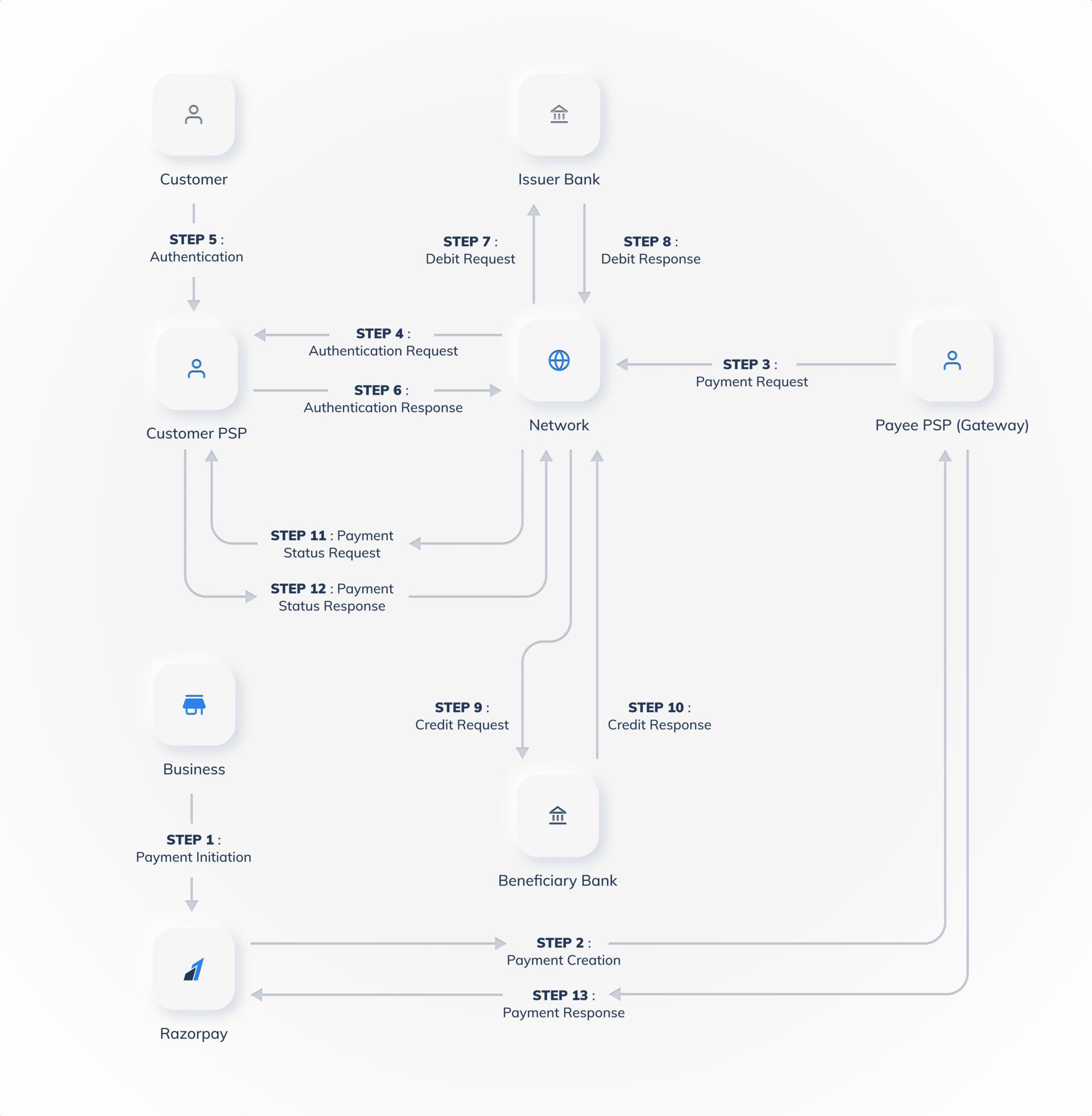
Collect Flow
The Collect Flow works like this:- Customers enter their VPAs or mobile number linked to their UPI in the Checkout.
- Open the respective UPI apps and complete the payment after 2-factor authentication (UPI PIN and MPIN are entered) on their mobile devices.
- Customers are redirected to your website or app after successful payment. Watch the video to see how UPI collect flow works.
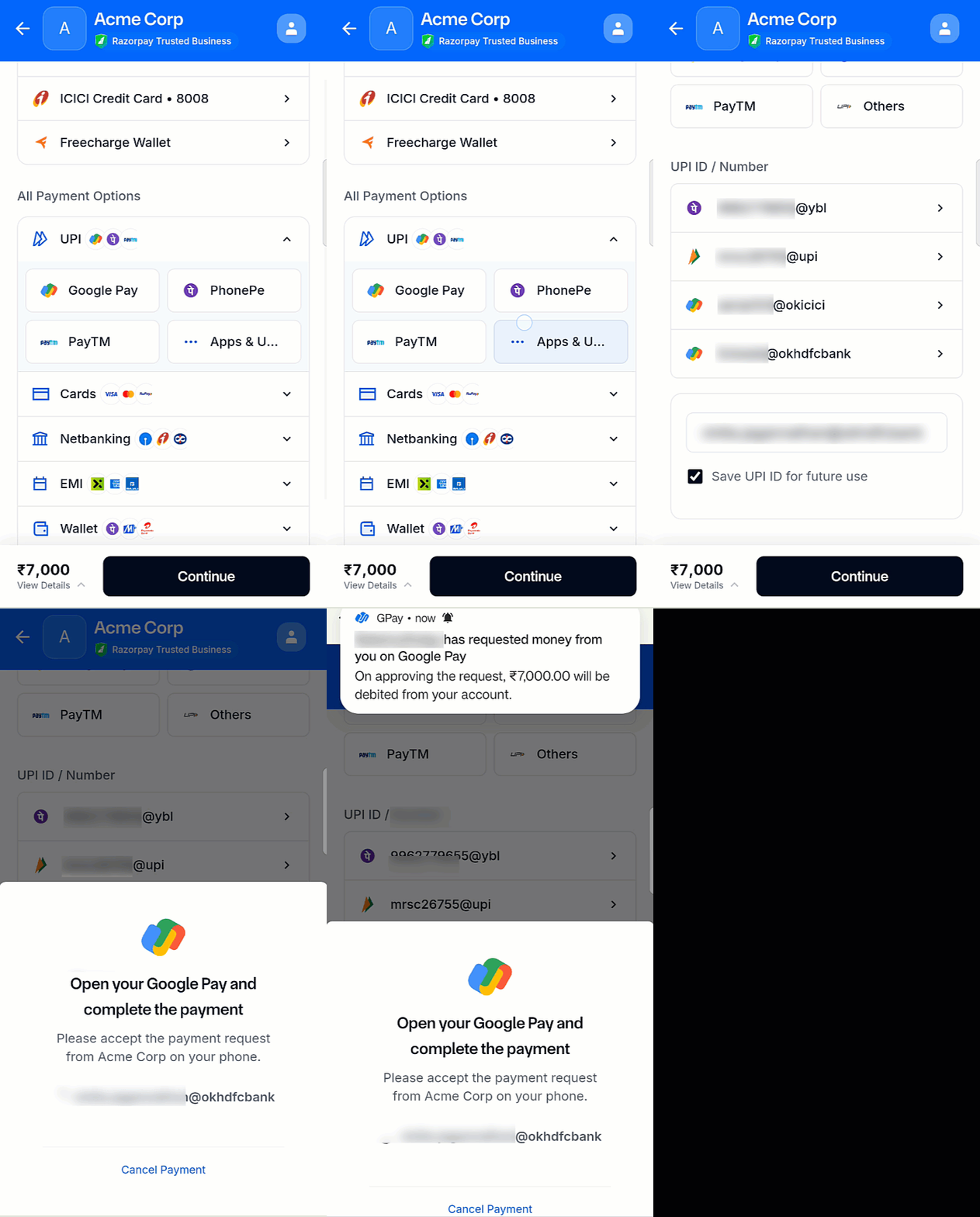 The customers must accept the request they receive on their UPI app to make the payment successfully.
Supported Platforms, UPI Apps and Availability
Supported Platforms, UPI Apps and Availability
Intent flow
After customers select the UPI payment app on the Checkout, the app is launched automatically on their mobile devices. Customers need not enter VPA or phone number as these details are prefilled and submitted along with the other payment details.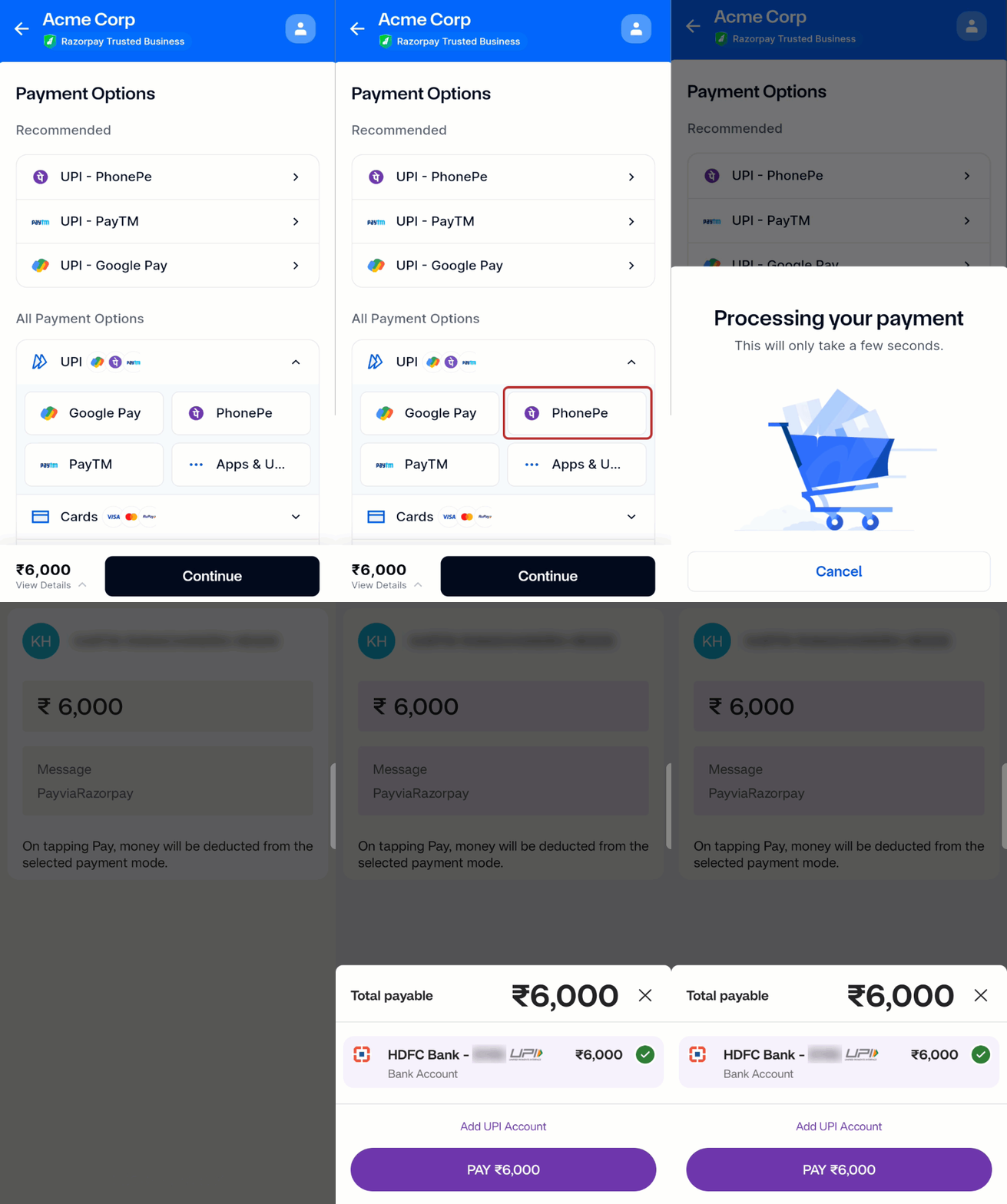
Supported Platforms, UPI Apps and Availability
Supported Platforms, UPI Apps and Availability
In-App Flow
Turbo UPI by Razorpay is an in-app process that enables businesses to accept UPI payments from customers within their mobile applications. Customers no longer need to switch to third-party UPI apps to complete payments in this flow. This helps increase payment success rates and improves customer experience. Know more about Turbo UPI. Given below is a sample UI representation: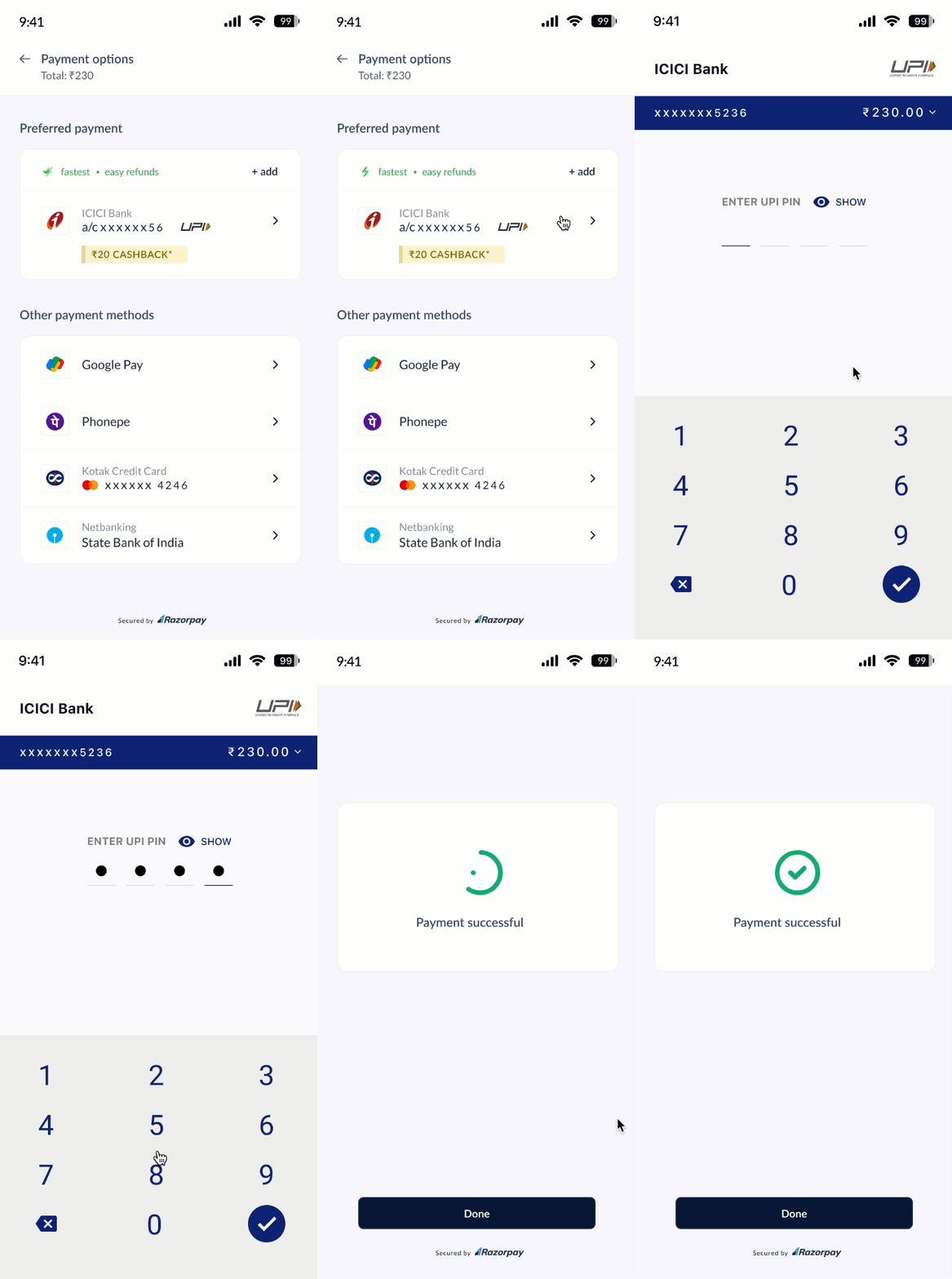
Supported Platforms, UPI Apps and Availability
Supported Platforms, UPI Apps and Availability
Omnichannel
This is an intent flow wherein customers enter their mobile numbers instead of VPAs in the UPI app. The payments are completed after 2-factor authentication (UPIN and MPIN are entered).Supported Platforms, UPI Apps and Availability
Supported Platforms, UPI Apps and Availability
Google Pay SDK
This is an intent flow wherein the customer can complete the payment within your app itself without being redirected to the UPI app on the mobile device. This is particularly useful when you want the customer to experience a seamless payment experience while safeguarding your brand identity.Supported Platforms, UPI Apps and Availability
Supported Platforms, UPI Apps and Availability
Third Party ValidationIf your business model requires the customers to make transactions only from the bank account that was submitted to your business at the time of registration then know more about Third-Party Validation. Check the list of banks that support TPV.